
Descript Audio Video Editor
$35.00
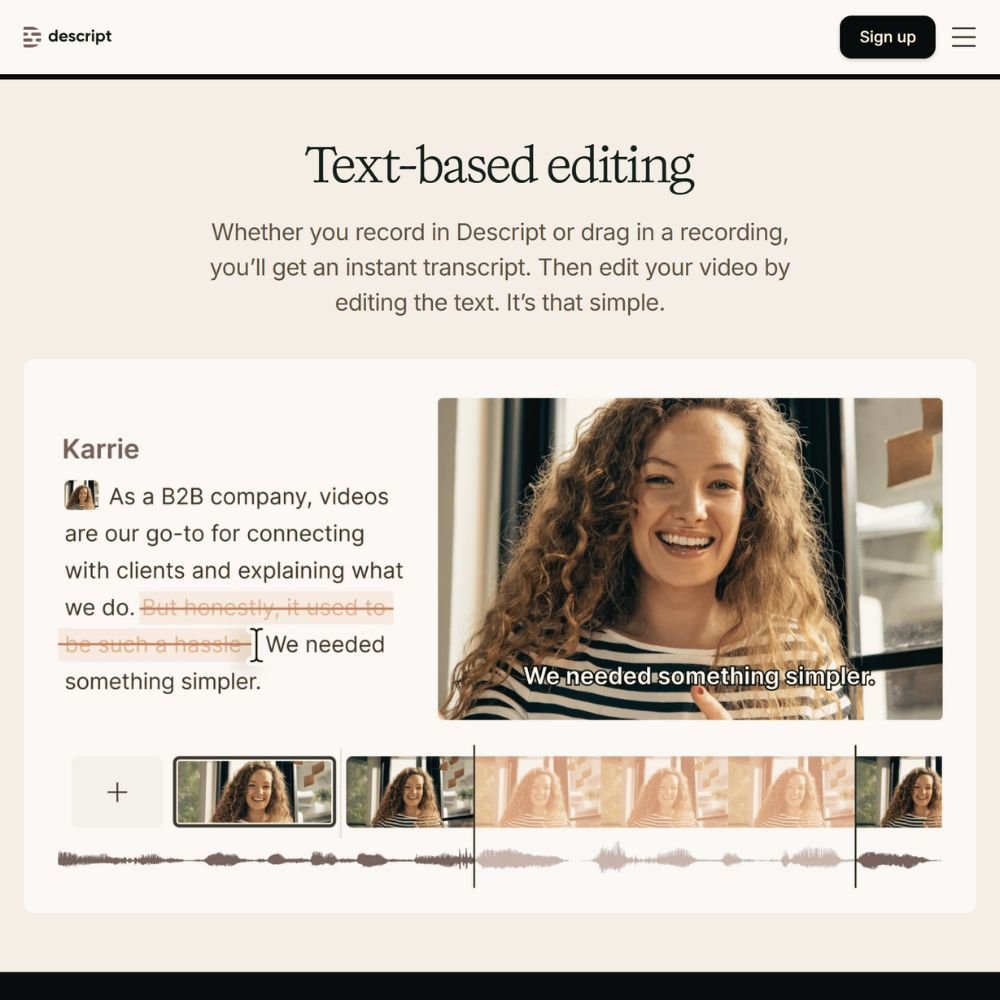
Edit your lessons as easily as editing text. Descript is the AI-powered audio and video editor we use and recommend for cleaning up lessons, adding captions, and creating professional clips fast. It combines precision editing with automatic transcription to save hours of production time.
- Edit by deleting words from the transcript
- Remove filler words and silence automatically
- Add captions, music, and transitions in one place
- Export clips for reels, previews, or promo posts
- Collaborate and comment directly in the app
Descript gives creators full control over their lessons without complicated timelines. You can record, edit, and publish with clarity and confidence — no advanced editing experience required.
Description
Descript turns video and audio editing into an intuitive process for creators who want great results without technical headaches. Once you upload a recording, Descript generates a full transcript you can edit like a document. Delete or rearrange text, and your video updates automatically.
It’s ideal for refining recorded lessons, podcast episodes, or walkthroughs. You can remove filler words, correct mistakes, or add new narration through Overdub — an AI voice that matches your tone. The interface feels natural and fast, helping you polish your work and keep your production on schedule.
Descript’s built-in Studio Sound enhances audio clarity while reducing background noise, making lessons sound crisp even if they were recorded in a less-than-perfect space. It’s your complete editing, captioning, and repurposing tool in one.
How It Helps
Course creators spend hours re-recording small sections. Descript eliminates that. You can fix mistakes instantly, trim clips, and generate accurate captions all in one timeline.
It’s also the easiest way to create promotional snippets from your existing lessons. Highlight a key moment, export it as a short video, and post it directly to your social platforms. Whether you’re producing a course, a coaching program, or a podcast, Descript simplifies editing and gives your content a polished, professional finish.
What’s Inside
Everything you need for fast, high-quality lesson editing.
- Text-based video and audio editing.
- Automatic transcription and caption generation.
- Overdub AI voice for easy retakes and updates.
- Studio Sound for background noise reduction.
- Collaboration tools for feedback and revisions.
We recommend Descript because it’s the same tool we use to clean, caption, and repurpose our own course videos. It delivers professional results without the learning curve.
More Resources
Editing is only one part of your creative process. You can find other trusted tools we use for recording, design, and course delivery inside the Shop, each tested in real creator setups for reliability and simplicity.
When your course videos are ready to publish, our LMS Platform Directory can help you compare course hosting systems that support smooth uploads, student access, and professional presentation.


Reviews
There are no reviews yet.